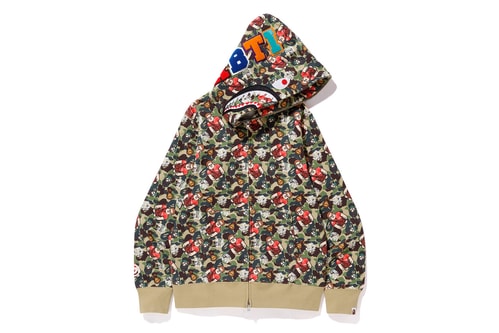
BAPE Japan Debuts Special The Weeknd Merch
Fashion

BAPE Japan Debuts Special The Weeknd Merch

To accompany a special meet and greet.

An On-Foot Look at the BAPE x NEIGHBORHOOD x adidas POD-S3.1
Footwear

An On-Foot Look at the BAPE x NEIGHBORHOOD x adidas POD-S3.1

Close up with the anticipated collab sneaker.

BAPE Celebrates Its New York Flagship's 14th Anniversary With Celebratory Tees
Fashion

BAPE Celebrates Its New York Flagship's 14th Anniversary With Celebratory Tees

Featuring a special Stature of Liberty Ape Head.

The BAPE x Dr. Martens Steel Toe Boots Get Spotlighted in New Lookbook
Footwear

The BAPE x Dr. Martens Steel Toe Boots Get Spotlighted in New Lookbook

With a special launch event to accompany the release.

Lil Yachty, Kid Cudi, and Big Sean Kick off the Return of the BAPE HEADS SHOW
Music

Lil Yachty, Kid Cudi, and Big Sean Kick off the Return of the BAPE HEADS SHOW

What?! No Teriyaki Boyz?

A First Look at the BAPE x NEIGHBORHOOD x adidas POD-S3.1
Footwear

A First Look at the BAPE x NEIGHBORHOOD x adidas POD-S3.1

Another collaboration in the pipeline.


BAPE Drops New Glow-In-The-Dark Mask
Fashion

BAPE Drops New Glow-In-The-Dark Mask

Winter ready wears.

BAPE Updates the Type 1 BAPEX With Gold and Silver
Watches

BAPE Updates the Type 1 BAPEX With Gold and Silver

Just in time for the holidays.

'Ralph Breaks the Internet' Teams up With BAPE for Playful Collaboration
Fashion

'Ralph Breaks the Internet' Teams up With BAPE for Playful Collaboration

Ralph and Vanellope play nice with Milo.

Paris Saint-Germain Teases New BAPE Collaboration
Fashion

Paris Saint-Germain Teases New BAPE Collaboration

More news coming soon, very soon.

BAPE Brings Tiger Camo to the Type 1 BAPEX
Watches

BAPE Brings Tiger Camo to the Type 1 BAPEX

An updated look.

BAPE Expands Its FW18 Accessory Lineup
Fashion

BAPE Expands Its FW18 Accessory Lineup

Cozy gear for the colder months.

Load More
 

Looks like you’re using an ad-blocker

We charge advertisers instead of our readers. Support us by whitelisting our site.

Whitelist Us

How to Whitelist Us

screenshot
  1. Click the AdBlock icon in the browser extension area in the upper right-hand corner.
  2. Under “Pause on this site” click “Always”.
  3. Refresh the page or click the button below to continue.
screenshot
  1. Click the AdBlock Plus icon in the browser extension area in the upper right-hand corner.
  2. Block ads on – This website” switch off the toggle to turn it from blue to gray.
  3. Refresh the page or click the button below to continue.
screenshot
  1. Click the AdBlocker Ultimate icon in the browser extension area in the upper right-hand corner.
  2. Switch off the toggle to turn it from “Enabled on this site” to “Disabled on this site”.
  3. Refresh the page or click the button below to continue.
screenshot
  1. Click the Ghostery icon in the browser extension area in the upper right-hand corner.
  2. Click on the “Ad-Blocking” button at the bottom. It will turn gray and the text above will go from “ON” to “OFF”.
  3. Refresh the page or click the button below to continue.
screenshot
  1. Click the UBlock Origin icon in the browser extension area in the upper right-hand corner.
  2. Click on the large blue power icon at the top.
  3. When it turns gray, click the refresh icon that has appeared next to it or click the button below to continue.
screenshot
  1. Click the icon of the ad-blocker extension installed on your browser.You’ll usually find this icon in the upper right-hand corner of your screen. You may have more than one ad-blocker installed.
  2. Follow the instructions for disabling the ad blocker on the site you’re viewing.You may have to select a menu option or click a button.
  3. Refresh the page or click the button below to continue.